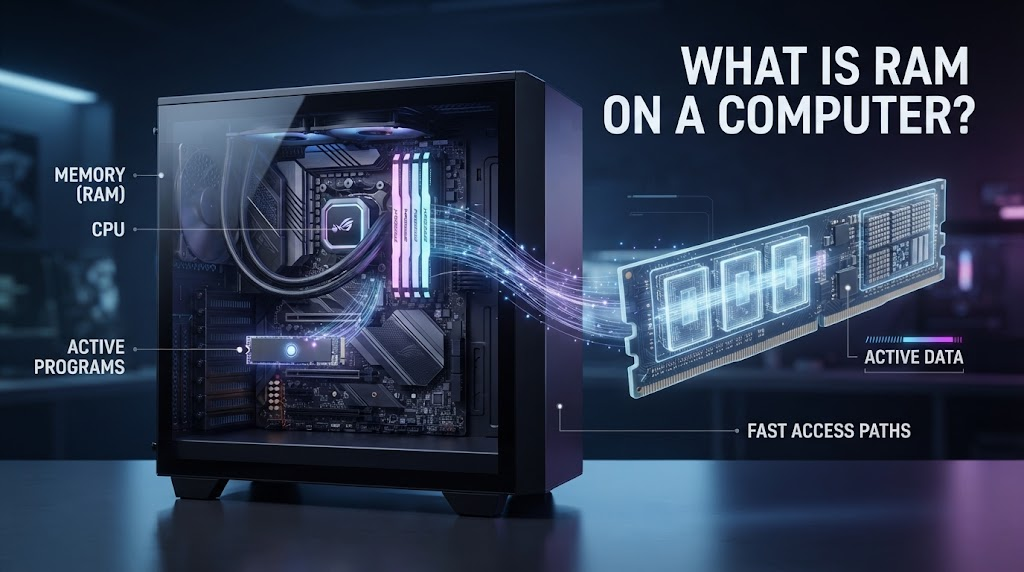
If you have ever wondered what is RAM on a computer, you are asking about one of the most important components that affects everyday computer performance. RAM stands for Random Access Memory, and it provides temporary, high-speed storage that your computer uses while programs and tasks are running.
When you open a browser, launch a game, edit a document, or switch between applications, your computer needs somewhere to keep the data it is actively using. That is where RAM comes in.
Understanding what is RAM on a computer can also help explain why a computer with more memory may handle multitasking more comfortably, while a system with insufficient RAM can become slow when too many applications are open.
What Is RAM on a Computer?
So, what is RAM on a computer in simple terms? RAM is the computer’s short-term working memory. It temporarily holds data and instructions that the processor needs quick access to.
Unlike a storage drive, RAM is designed for extremely fast access during active tasks. When you shut down or restart the computer, the information stored in RAM is normally cleared.
For example, when you open a web browser, the operating system loads relevant program data into RAM so the processor can access it quickly. If you open several browser tabs and applications, more RAM may be used.
This is why understanding what is RAM on a computer is essential when comparing computer specifications.
How Does Computer RAM Work?
To understand what is RAM on a computer, imagine RAM as a temporary workspace on your desk.
Your computer’s processor, or CPU, constantly needs information while performing tasks. Instead of retrieving everything from a comparatively slower storage drive, the operating system can keep frequently needed data in RAM.
RAM uses electronic memory cells to store data that can be accessed rapidly. Modern computers commonly use forms of Dynamic Random-Access Memory, or DRAM.
The CPU communicates with memory through the system’s memory controller, allowing programs and data to move between the processor, RAM, and storage.
The result is a system that can quickly access information required for currently running applications.
Why Is RAM Important?
When people ask what is RAM on a computer, they are often trying to understand why RAM matters so much to performance.
RAM affects how comfortably a computer can handle multiple active programs and large workloads. More RAM does not automatically make every computer faster, but having enough memory prevents the system from constantly moving active data between RAM and storage.
For example, someone working with a few browser tabs and a word processor may not need as much RAM as someone editing high-resolution video while running several other applications.
The amount of RAM you need therefore depends heavily on what you do with your computer.
RAM vs. Storage: What Is the Difference?
One of the most important concepts when learning what is RAM on a computer is understanding the difference between memory and storage.
RAM is temporary working memory. Storage, such as an SSD or hard drive, is designed to keep files and applications even after the computer is turned off.
Think of RAM as your work desk and storage as a filing cabinet. The desk gives you quick access to the things you are currently working on, while the filing cabinet keeps information for the long term.
A computer needs both. RAM helps active tasks run efficiently, while storage keeps your operating system, applications, documents, photos, videos, and other files.
What Happens When You Run Out of RAM?
Understanding what is RAM on a computer becomes especially useful when your system starts slowing down.
When available RAM becomes limited, an operating system can move some data from RAM to storage. This process is commonly associated with virtual memory, paging, or swapping.
Because even fast SSD storage is generally slower than RAM for active memory operations, heavy reliance on virtual memory can make the computer feel less responsive.
You may notice applications taking longer to switch, programs becoming less responsive, or the system generally feeling sluggish when memory pressure is high.
Adding more RAM can help when insufficient physical memory is the actual bottleneck.
How Much RAM Does a Computer Need?
The answer to what is RAM on a computer naturally leads to another question: how much RAM is enough?
There is no single amount that works perfectly for everyone. Basic everyday computing can function with a modest amount of memory, while demanding workloads require considerably more.
A computer used mainly for web browsing, email, documents, and streaming does not necessarily need the same amount of RAM as a professional workstation used for video editing, 3D rendering, software development, or large datasets.
Modern operating systems and applications also continue to evolve, so memory requirements can change over time.
For a new computer, choosing enough RAM for your expected workload is generally more useful than simply choosing the largest available amount.
Does More RAM Make a Computer Faster?
A common misunderstanding about what is RAM on a computer is that adding more RAM always makes the computer faster.
More RAM primarily helps when the existing amount is insufficient for your workload. If your computer already has plenty of available memory, adding additional RAM may produce little noticeable improvement.
For example, increasing RAM can make a major difference when a computer frequently runs out of memory while multitasking. But if the system rarely approaches its memory limit, another component may be responsible for slow performance.
CPU performance, storage speed, graphics capability, software optimization, and thermal conditions can all influence how fast a computer feels.
What Is RAM Speed?
RAM capacity is not the only specification that matters. RAM also has performance characteristics such as data rate, latency, and memory-channel configuration.
Modern memory technologies, including DDR4 and DDR5, offer different performance capabilities. DDR5 is a newer memory generation designed to provide higher data rates and other architectural improvements compared with DDR4.
However, RAM compatibility depends on the motherboard and processor platform. You cannot assume that every computer supports every type of memory.
When upgrading RAM, it is therefore important to check the specifications of the computer or motherboard first.
What Is the Difference Between RAM and ROM?
Another common question related to what is RAM on a computer involves ROM.
RAM is primarily used as temporary working memory for active tasks. ROM, or read-only memory, traditionally refers to non-volatile memory designed to retain information without continuous power.
In modern computing, the terminology can be more complicated because firmware may be stored in flash memory rather than traditional ROM.
For everyday computer upgrades, however, RAM usually means the system’s main volatile memory used by the operating system and applications.
Does RAM Affect Gaming?
RAM can be important for gaming, particularly when modern games require substantial memory or when the player runs other applications simultaneously.
When researching what is RAM on a computer for gaming, remember that RAM is only one part of the system. The graphics processing unit, CPU, storage, cooling, and game optimization also have major effects on performance.
Insufficient RAM can cause stuttering or performance problems in certain workloads, while having enough RAM allows the system to manage the game and background applications more comfortably.
How Can You Check Your Computer’s RAM?
Most modern operating systems allow you to view installed RAM through their system information or task-management tools.
On Windows, the Task Manager can show installed memory and current memory usage. macOS provides memory information through System Settings and Activity Monitor.
Checking actual memory usage can be more useful than guessing whether you need an upgrade. If your computer consistently reaches high memory utilization during your normal workload, additional RAM may be worth considering.
Final Thoughts on What Is RAM on a Computer
So, what is RAM on a computer? RAM is the computer’s fast, temporary working memory. It stores data and instructions that the CPU and active applications need to access quickly.
Unlike an SSD or hard drive, RAM normally loses its contents when power is removed. Its purpose is not long-term file storage but fast access to information needed during active computing.
Understanding what is RAM on a computer makes it easier to evaluate computer specifications, diagnose performance issues, and decide whether an upgrade could be useful.
The most important point is that more RAM is not automatically better. The ideal amount depends on your operating system, applications, multitasking habits, and workload. When a computer has enough RAM for what you normally do, the system can operate much more comfortably without relying heavily on slower storage for temporary memory needs.
FAQs About What Is RAM on a Computer
What is RAM on a computer used for?
RAM temporarily stores data and instructions that the CPU and active applications need quick access to while the computer is running.
Is RAM the same as storage?
No. RAM is temporary working memory, while storage such as an SSD or hard drive keeps files and applications even when the computer is turned off.
Does more RAM make a computer faster?
More RAM can improve performance when your computer does not have enough memory for its workload. If you already have sufficient RAM, adding more may have little effect.
How much RAM does a computer need?
The amount depends on how you use the computer. Basic tasks require less memory than gaming, video editing, programming, or professional workloads.
Can I upgrade my computer’s RAM?
It depends on the computer. Many desktop PCs and some laptops allow RAM upgrades, while some modern laptops have memory soldered directly to the motherboard.
MORE RELATED BLOG: